
Facebook Video Downloader
How to download video from Facebook?
To download video facebook, you need to follow these three easy steps. See their description below.
What is a Facebook Video Downloader?
The Facebook Video Downloader is a tool that allows you to easily download images, videos, and posts from Facebook, With this tool, you can save your favorite content to your device, so you can view it anytime, anywhere. Whether you want to save a video for offline viewing or share a post with your friends and family, the Facebook Downloader makes it easy and convenient.
Why Use a Facebook Video Downloader?
There are several reasons why you might want to download Facebook videos.
- You may want to watch a video offline
- Share it with friends and family, or use it in a project
- With a Facebook Video downloader , you can easily download Facebook videos to your device without having to copy and paste video links or install additional software
How to Use a Facebook Video Downloader?
Using a Facebook Video downloader is easy and straightforward. Here are the steps to download Facebook videos using a Facebook Video downloader:
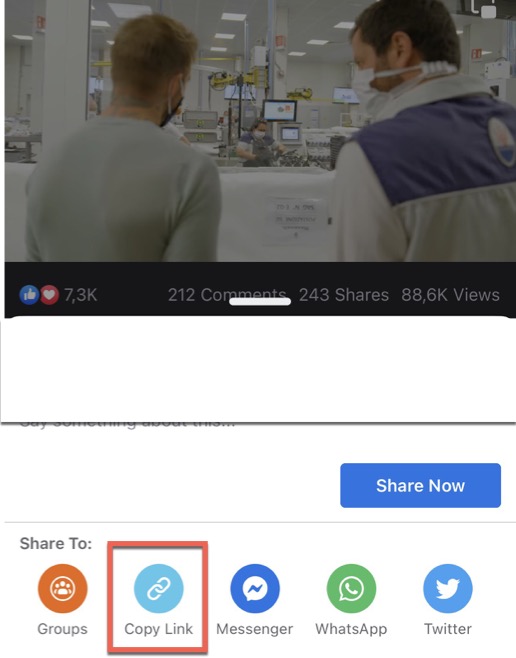
- 1. Copy the video link: Open the Facebook video you want to download and click the ‘Share’ button. Copy the link from the ‘Share’ option.
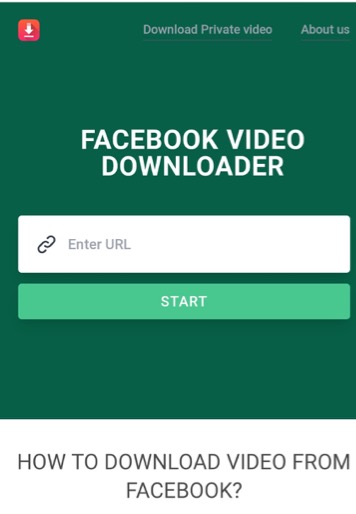
- 2. Paste the link into the Facebook downloader : Go to the Facebook Video downloader website and paste the link into the downloader.
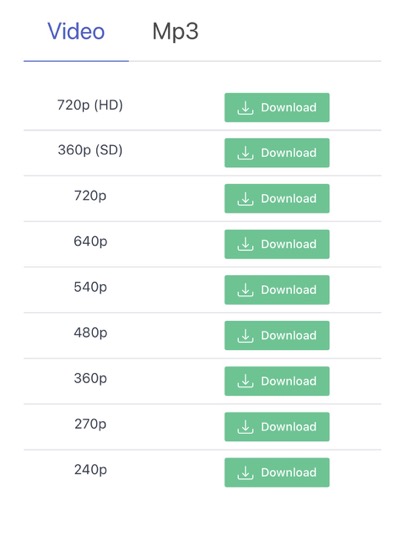
- 3. Choose the download format: Select the format in which you want to download the video, such as MP4, WEBM, or 3GP.
- 4. Download the video: Click the ‘Download’ button and wait for the video to be downloaded to your device.
If you have suggestions or report bugs? let’s contact us us now
Frequently asked questions
How to get the Facebook video download link?
- Open your Facebook application or go to facebook.com
- Choose the video that you want to download
- Click Share and at the Share options, find Copy Link button.
- Your download URL is ready on the clipboard.
Is it legal to download videos from Facebook using a video downloader?
It depends on the source of the video and the intended use of the video. In general, downloading videos from Facebook without the permission of the video owner may be considered copyright infringement and is illegal. However, if the video is in the public domain or the owner has given permission to download the video, it may be legal to download it using a Facebook video downloader.
Is it possible to download videos from Facebook in high quality?
Yes, it is possible to download videos from Facebook in high quality. The quality of the downloaded video will depend on the quality of the original video and the video downloader you are using. fbdowloader.live allow you to choose the video quality, so you can select the highest quality available.
Where are Facebook videos saved after being downloaded?
When you’re downloading files, they are usually saved into whatever folder you have set as your default. Your browser normally sets this folder for you. In browser settings, you can change and choose manually the destination folder for your downloaded Facebook videos.
Does fbdownloader.live store downloaded videos or keep a copy of videos?
fbdownloader.live doesn’t store videos, neither do i keep copies of downloaded videos. All videos are hosted on Facebook’s servers. Also, i don’t keep track of the download histories of our users, thus making using fbdownloader.live totally anonymous.
Do I need to install instructions or extensions?
No. I try to keep things easy for our users. All you need is your Facebook download video links. That’s it.
Do I have to pay to Facebook Downloader ?
No, you don’t have to pay for anything because our software is always free. You can support us by turning off your Ad Blocks or making donations. It supports our further development.
Can I use this Facebook video downloader on my Android phone?
Yes, it’s better to use fbdownloader.live to save Facebook videos on your Android phone. fbdownloader.live is super FAST, 100% FREE, and getting updated frequently.
How do I save facebook video /download my favorite facebook videos to my iPhone (IOS)?
Because of Apple security policy, you can’t normally download any videos Mp4 facebook, music (Mp3), or movies to your iPhone just like you can do it with Android phones. But there are some methods to deal with it, please follow this introduction how to download Facebook video with your iPhone.
Does fbdowloader have a download limit?
facebook downloader you can download videos without any download limit
Why choose fbdowloader to download videos from facebook ?
fbdownloader supports downloading videos from facebook with high quality, full hd, 2k, 4k. Can download mp3 music from video fb video download In addition to downloading videos from facebook, it also supports converting facebook videos to mp3 music